
How many hours a week do your teams spend copying data from one piece of software to another? An export here, a copy-paste there, an Excel file reformatted before being imported elsewhere. Nobody really keeps count. And that is exactly the problem.
What is n8n? In a nutshell: an automation tool that moves information between your software applications instead of your employees. No heavy development required, and you keep full control over your data.
An SME typically uses email, an ERP, a CRM, accounting software, shared spreadsheets, and sometimes a supplier portal. Each one does its job well. Except that between them, there is often no one. Or rather, there is someone. An employee acting as a manual bridge.
These tasks have three things in common. They are repetitive, they add no value in themselves, and they generate errors. Not because people are bad at their jobs, but because a human reformatting the same file every morning will inevitably, one day, pick the wrong column.
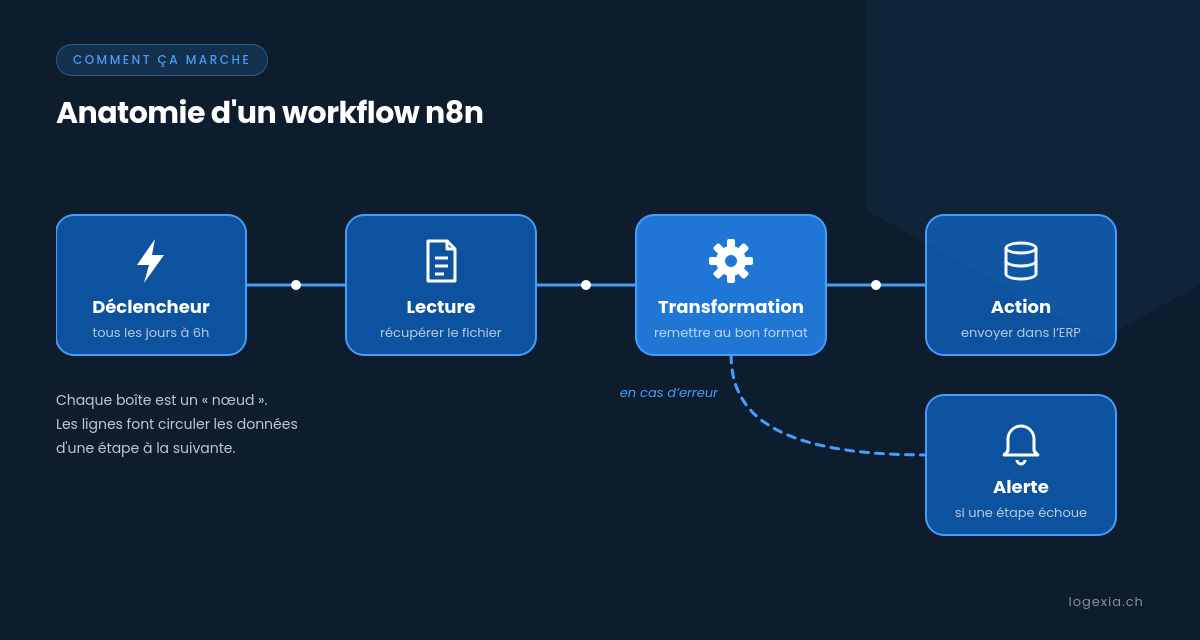
Imagine a whiteboard where you draw a circuit. Each step is a box (n8n calls this a "node"): "when a file arrives," "read it," "reorder the columns," "send it to the ERP," "notify the team if something goes wrong." You connect the boxes, and the circuit runs on its own. This is what we call a workflow.
The starting point, or trigger, can be a schedule (every day at 6 a.m.), an event (a new file uploaded, a form filled out), or a webhook—basically a web address that another application calls to signal that something has happened.
Born in Berlin in 2019, n8n offers hundreds of ready-to-use connectors for common tools: Microsoft 365, Google Workspace, databases, CRMs, and messaging apps. When a connector doesn't exist, n8n can talk directly to any application that exposes an API (a standardized gateway for exchanging data).
Two things set it apart from better-known competitors like Zapier or Make.
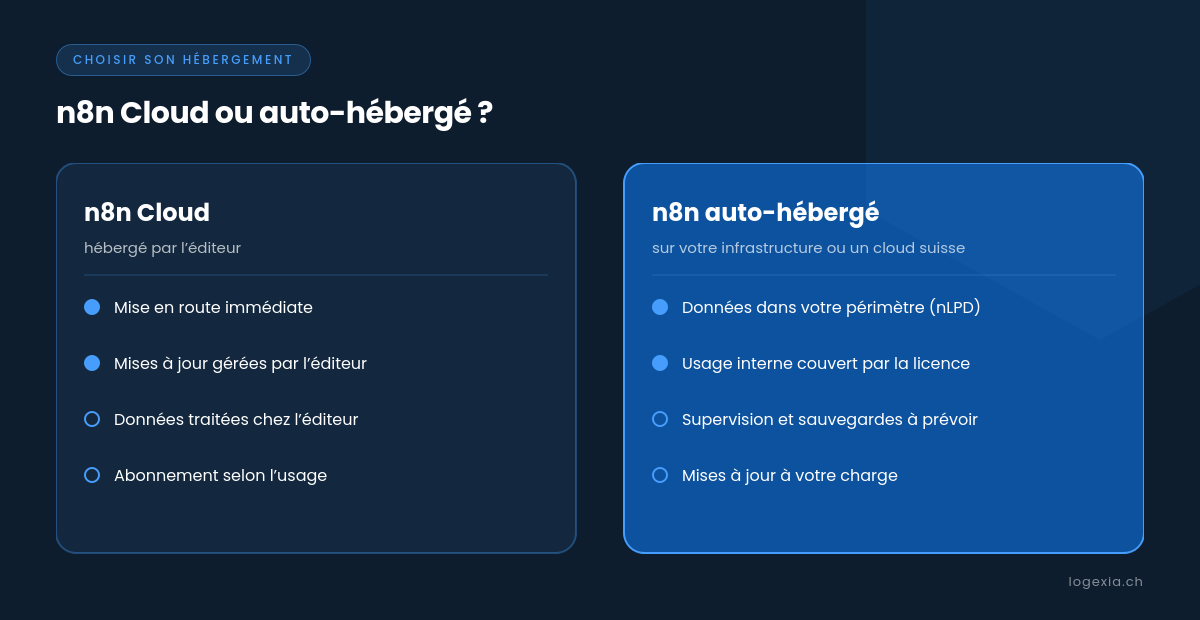
The first: it can be self-hosted. Instead of running on a vendor's servers, n8n can be installed on your own infrastructure, typically in a Docker container on an internal server or with a Swiss hosting provider. Your data does not pass through a third party.
The second: its license. n8n is not "open source" in the strict sense, but is distributed under a fair-code license, the Sustainable Use License. It allows for use and modification for your internal business needs. What it prohibits is reselling n8n as a commercial service. For an SME automating its own processes, this is exactly the intended use case.
For a long time, connecting two software programs meant launching a development project : a specification document, a service provider, a budget, and ultimately a script that no one dares to touch three years later. Automation was a luxury for large accounts.
Tools like n8n are changing the game. A simple workflow can be built in a few hours, a more complex one in a few days. It is visual, meaning it can be read by someone other than the person who created it. And it can be modified as the process evolves, without having to start from scratch.
For a manager, the benefits come down to three points. Time returned to teams on tasks that no one likes to do. Fewer errors, because a machine applies the same rule every time. And better traceability: every execution is logged, so you know what went through, when, and what failed.
In Switzerland, the self-hosted option has an additional argument. With the new Federal Act on Data Protection (FADP), knowing where customer or supplier data is transiting is no longer a minor detail. Keeping the automation tool in-house makes the answer much simpler.
During a recent assignment, we supported a distribution player in Switzerland. Every day, stock information sent by suppliers had to be integrated into the ERP. The process was entirely manual: retrieving files, reformatting them to match the format expected by the ERP, and then importing them.
The result: about 2 hours of work per day. Over a year, this represents more than 400 hours spent on pure file manipulation. And above all, manual formatting was a recurring source of human error. A shifted column or a poorly copied reference, and the stock in the ERP is incorrect, with a direct risk to sales and orders.
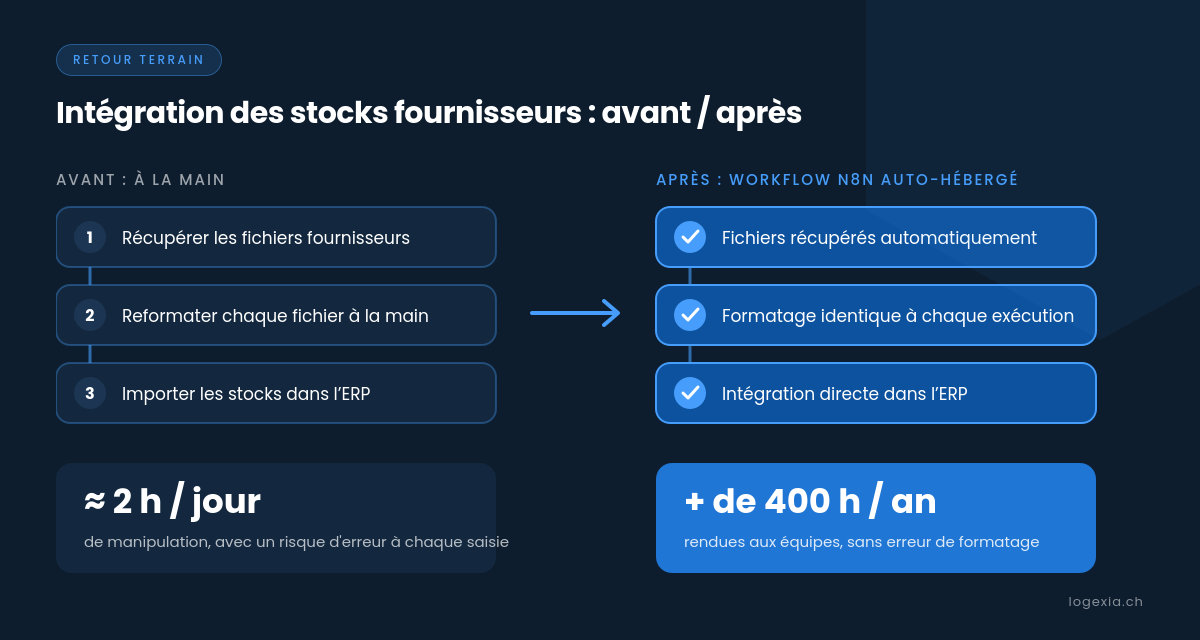
We implemented a self-hosted n8n workflowthat handles the entire chain: retrieving supplier files, transforming them into the expected format, and then integrating them into the ERP. The two hours of daily manual work disappeared, and with them the risk of error during formatting.
Self-hosting made perfect sense here. Stock and supplier data are highly commercially sensitive: they remain within the company's perimeter, without compromising on functionality.
Start small. The right first workflow is a repetitive, frequent task with clear rules. Not the most critical process in the company. A quick initial success is more convincing than a grand plan. We have detailed this approach in our article on automation for SMEs.
Measure before you automate. How long does the task take today, and how many errors does it generate? Without this baseline, it is impossible to prove the gains later on. In the case above, it was those 2 hours a day that triggered the decision.
Treat n8n like a production application. A workflow that feeds your ERP is a critical link. You must monitor it (alerts in case of failure), back it up, update it, and secure its access, because n8n stores the login credentials for your other software. Self-hosting means gaining control, but it also means taking on the daily responsibility.
Assign an owner to every workflow. Automation without an identified owner quickly becomes a black box. Naming a person in charge and describing each workflow in two lines prevents the creation of that infamous script that no one dares to touch anymore.
There is nothing magical about n8n: it automates what you can clearly describe. But in many SMEs, a good portion of the most tedious tasks fits exactly into this category. The real question is not "should we automate?", but "what tasks are your teams still doing by hand every morning?".