

Everyone is talking about it. Half of all SME leaders watched a ChatGPT demo last year. Yet, in most companies with 20 to 100 employees, processes are running exactly as they always have: an Excel spreadsheet for monthly reporting, an overflowing inbox, and marketing campaigns analyzed by hand on Friday nights.
In a mid-sized SME, time wastage has become the norm. The sales manager spends 30 minutes every morning sorting through emails before doing anything productive. At the end of the month, management waits for someone to compile sales figures from the CRM, accounting software, and the field team's Excel sheets—a task that takes an entire day.
No one questions it. That’s just "how things work." But these hours add up. And the good news in 2026 is that they are all automatable.
In an SME environment, AI effectively absorbs repetitive, low-value tasks so that your team can focus on what really matters.
Email management. An agent connected to your inbox can sort messages by priority, flag those requiring an urgent response, and draft replies for recurring requests. It takes ten minutes instead of forty-five.
Automated reporting. Whether your data lives in your ERP, HubSpot, Salesforce, or shared spreadsheets, an agent can aggregate it, format it, and send you a weekly or monthly report without any human intervention.
Marketing campaign tracking. Open rates, conversions, cost per lead: an agent monitors these metrics continuously, compares them to previous weeks, and alerts you when something is out of the ordinary.
Intelligent chatbots. Modern language-model-based assistants understand context, retrieve information from your internal documents, and escalate to a human when the situation requires it.
The biggest mistake in an AI automation project is trying to automate everything at once.
Step 1: Process audit. We map out what is actually happening: which tasks recur every week, who does them, and how long they take. Two to four hours that consistently reveal things the leadership team didn't know.
Step 2: Identify what can be automated. Look for repetitive, low-value tasks that involve structured data. Compiling a monthly report ticks all three boxes. A sales negotiation does not.
Step 3: Launch a pilot program. Start with one or two simple automations within a limited scope to measure real gains and win over your team by example.
Step 4: Scale up. Once the pilot is validated, expand to more complex automations.
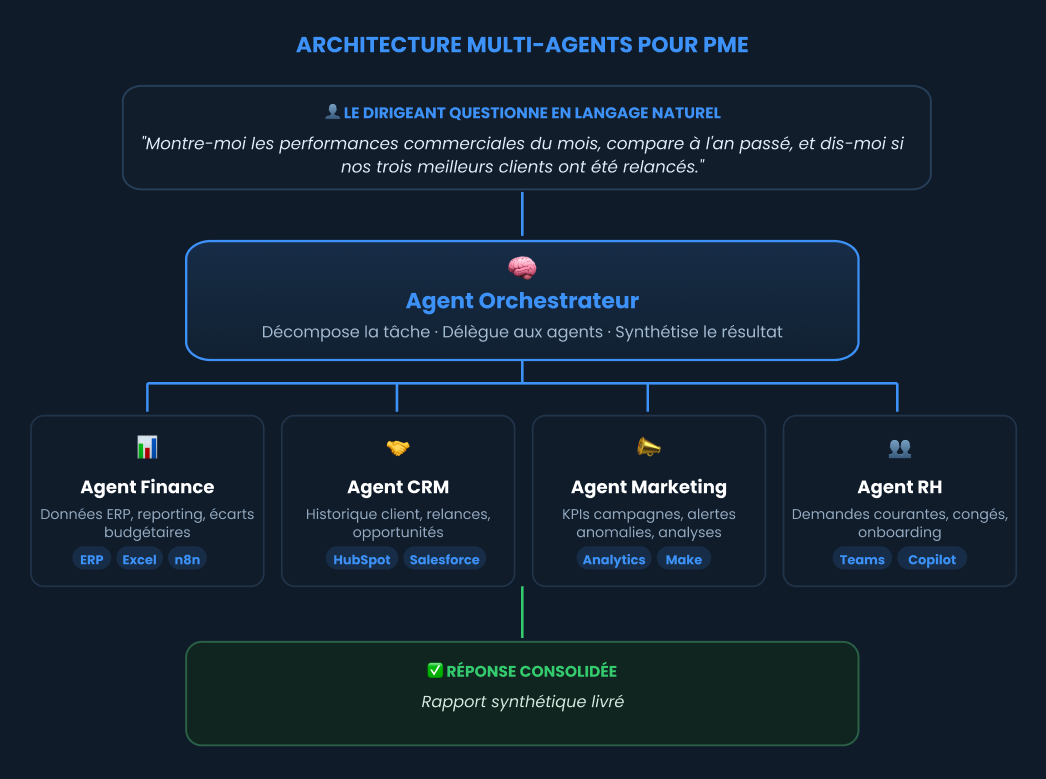
This is where things get really interesting: multi-agent architectures. Each department has its own specialized AI assistant—one that knows your financial data, another your product catalog and customer history, a third your marketing campaigns, and a fourth your routine HR requests.
Above these specialized agents sits the orchestrator agent. You interact with it using natural language. It breaks down the task, delegates it to the relevant agents, and synthesizes the result for you, all without you ever having to touch a dashboard.
This is exactly what tools like Microsoft Copilot Studio, n8n, or Make allow you to build today, with reasonable budgets and within a few months.
Indutec (a fictional but realistic case), an industrial distributor with thirty employees. Every month, the management report takes two days to compile. The sales manager spends forty-five minutes every morning on emails.
After a half-day audit, we implemented three automations: the monthly report (ERP and CRM data connected via n8n, saving a day and a half per month), email triage (drafts for 60% of messages, saving three hours per week), and campaign alerts (weekly KPI comparison). Three-month result: approximately fifteen hours saved each week across the team.
Don't automate what you don't understand. Automating a messy process only accelerates the chaos. The audit always comes first.
The need comes before the tool. n8n, Make, Power Automate, and Copilot Studio are all great tools, but the choice should be made only after defining what you want to automate.
A failed pilot is better than a deployment that never gets off the ground. You learn that in four weeks instead of a year.
Humans remain in the loop. AI prepares, suggests, and alerts; the decision remains human.
AIautomation is no longer reserved for large corporations. A small business with thirty employees can now automate repetitive tasks and implement an orchestration agent. The challenge isn't technical: it's deciding where to start. And that is precisely the purpose of a good process audit.