

The sticky note stuck under the monitor. The Excel spreadsheet titled "passwords 2026." The Word document hidden in a "misc" folder. Or, more discreetly, the Chrome browser that "offers to remember" passwords, which everyone accepts without a second thought.
This is the reality for many SMEs. It’s not intentional negligence, just a lack of process. However, in a landscape where cyberattacks target small businesses just as much as large ones, this approach comes at a cost.
Browsers are convenient. They remember everything and fill in everything. However, passwords stored in Chrome, Edge, or Firefox are encrypted with operating system keys, not your own secret. If someone gains access to your Windows session, they also gain access to all your passwords via a simple native export or widely available third-party tools.
Excel or Word files are even worse: the file gets shared via email, sent over Teams, ends up in a personal cloud, or on a USB drive. There is no traceability and no serious encryption; the "password" on an Office file can be bypassed in minutes.
And the sticky note… we don't even need to go there.
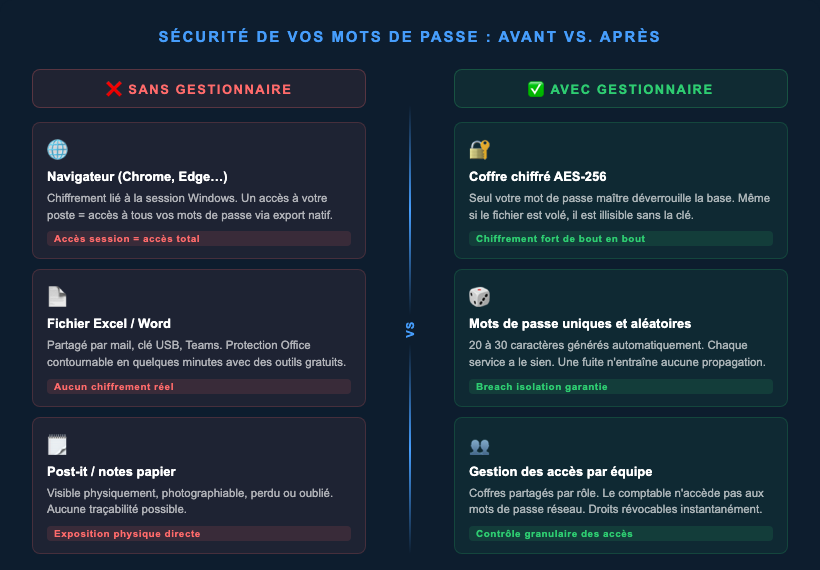
A password manager is a digital vault. All your credentials are stored in an encrypted database (AES-256 for reputable solutions), protected by a single secret: your master password.
You create an entry for each service. The manager generates a long, random password for you, auto-fills the fields, and ensures every service has a unique password. If one is leaked, the others remain secure.
Phishing, database breaches, and credential stuffing mean that even a strong password can end up in the wrong hands. This is where MFA (multi-factor authentication) comes in: proving your identity with at least two distinct factors.
Most modern managers natively include a TOTP generator (those 6-digit codes that change every 30 seconds). No need for a separate app: the entry contains the username, password, and OTP code all in one place.
Passkeys replace passwords with a pair of cryptographic keys. No secret is transmitted over the network; by design, man-in-the-middle attacks are ineffective against this mechanism. Modern managers (1Password, Bitwarden, Proton Pass) now allow you to store and use your passkeys directly.
If you want to understand why passkeys are structurally resistant to MITM attacks where a standard OTP code might fail, we’ve written a dedicated article on the subject.
Bitwarden : open source, self-hostable, excellent value for money (Business plan ~ $5/user/month). Publicly auditable code.
1Password : the most polished interface on the market, ideal for less technical teams. Permission management via shared vaults, Entra ID integration available (~ $6/user/month).
KeePass / KeePassXC : 100% local, no cloud, free and open source. The trade-off: you manage synchronization between devices yourself.
Proton Pass : developed by Proton, open source, end-to-end encryption, built-in email alias management. A great option for digital sovereignty.
Yes, it is possible. Bitwarden offers a self-hostable version (Vaultwarden compatible), KeePass works on this model by design, and Passbolt is built for team self-hosting. Self-hosting has a real cost: maintaining the server, ensuring backups, and managing updates. An unmonitored and unbacked-up password server is a classic weak point during incidents.
Before: passwords for the VPN, business tools, customs portal, and supplier access were sitting in a shared, unencrypted Excel file. We deployed 1Password (managed cloud), imported the credentials, regenerated critical access, and enabled MFA. Within two weeks, every employee had their own account with permissions differentiated by vault.
Three months later, an employee's email was compromised during a third-party service leak. Since the password for that service was unique, the incident remained isolated with no propagation.
Browser-based storage is not enough once a team needs to share access. Start with critical access points (VPN, professional email, management tools, banking access). Enable MFA wherever possible. Self-hosting is a valid option if you have an internal IT department or a dedicated provider; otherwise, a reliable cloud solution is better than a poorly maintained server.
A password manager is rarely the most spectacular solution, but it is a concrete first step toward integrating good security practices into your company.