

Your team has enabled MFA. The authenticator app is running, and OTP codes refresh every thirty seconds. Yet, this month, an account was compromised anyway.
This is not a theoretical scenario. It is what happens when a man-in-the-middle attack is well-executed. The OTP code? Relayed in real-time, before it even expires. The session? Stolen once authentication is complete. FIDO2 and passkeys were designed specifically to block this vector.
A MITM attack on an authentication process does not attempt to break encryption. It slips between the user and the target service, relays the exchange in real-time, and intercepts the data in transit.
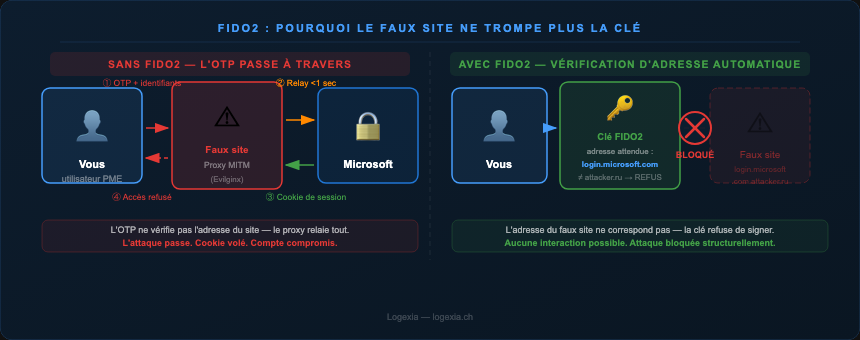
For a six-digit OTP code, the window is thirty seconds. That is more than enough time. The attacker presents a fake login page, captures the credentials and the entered OTP code, immediately transmits them to the real service, obtains the session, and disappears. Tools like Evilginx or Modlishka automate this type of attack: they function as transparent reverse proxies.
SMS and email are even more exposed to the same relay method if the fraudulent page is convincing enough.
FIDO2 / WebAuthn relies on a radically different mechanism. During the initial setup, your device generates a pair of cryptographic keys: a private key (which never leaves the device or physical security key) and a public key registered with the service.
No secrets are transmitted during authentication. The service sends a random challenge, your device signs it with the private key, and the service verifies the signature with the public key. There are no OTP codes to relay and no passwords to intercept. Even if someone intercepts the traffic, they gain nothing usable.
When you create your FIDO2 credentials on a service, your device remembers the exact address of the real site: not just "Microsoft," but login.microsoft.com. This binding (origin binding) ensures that the cryptographic key will never work on a different address, even one that looks very similar.
If an attacker creates a perfect copy of the Microsoft page, even with a green HTTPS padlock, the address will be different. login.microsoft.com.attacker.ru is not login.microsoft.com. FIDO2 refuses to authenticate before the connection is even established.
Advanced phishing and MITM attacks no longer target only large corporations. Smaller organizations are often more accessible: they have fewer security resources, more shared admin accounts, and less monitoring for anomalous logins.
A ransomware attack that begins with a compromised Microsoft 365 account can paralyze a 30-person company in a matter of hours. Passkeys are now natively supported by Windows Hello, macOS, iOS, and Android. For an SMB managing identities via Entra ID, the migration to FIDO2 is shorter than it seems.
A 35-person distribution company with two IT staff members and Microsoft 365 with MFA enabled everywhere. A sales manager clicks on a phishing email. The page looks exactly like the Microsoft login screen. He enters his credentials, validates the OTP, and the attacker gains a valid session cookie for eight hours.
FIDO2 migration was completed a few weeks later: YubiKeys for privileged accounts, Windows Hello passkeys for others. Phishing attempts continue to arrive but no longer get through. Start with high-risk accounts: Microsoft 365 admins, high-privilege VPN access, and finance or HR accounts.
YubiKey for critical access, passkeys for everything else. Physical keys remain the gold standard for sensitive accounts; software-based passkeys (Windows Hello, iCloud Keychain) are perfectly suitable for standard users. Both can coexist within Entra ID.
Be clear about what FIDO2 does not protect. Origin binding blocks MITM attacks during authentication. However, if an attacker steals the session cookie after a successful login (session hijacking), the protocol cannot prevent it. For SSO, also check the lifespan of your OIDC tokens.
Test before you deploy. Running a pilot with five users for two weeks prevents production bottlenecks.
The question is no longer whether FIDO2 is worth it, but rather which accounts to start with. And since phishing almost always begins with a spoofed email, consider testing your domain's SPF, DKIM, and DMARC protection for free.